
- Your cart is empty
- Continue Shopping


₦1,100,000.00
 King / Pre-sale Questions
Need Help? Contact Us via WhatsApp
King / Pre-sale Questions
Need Help? Contact Us via WhatsApp
Fit everything in the frame
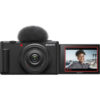
With the Sony ZV-1F Vlogging Camera, you can truly capture it all – it allows you to snap a group selfie along with an expansive view of the background scenery. Since the camera’s ultra-wide-angle 20 mm lens captures a wider field of view than the human visual field, you can take images with eye-popping depth and perspective, even in narrow spaces, both indoors and outdoors.
Beautiful skin tones for everyone
Look your best any time you’re shooting. Without any special settings, the Sony ZV-1F Vlogging Camera will accurately capture your skin tone, ensuring you a healthy and natural look. There’s also a Soft Skin Effect selectable to OFF/ Low/ Mid/ High to adjust your skin smoothness.
Sharp autofocus, bright face
Using Eye AF, the camera automatically recognizes human faces and eyes, making sure you stay in focus in front of the lens. Switching the focus to another subject is easy – just touch the screen. There’s no need to worry about lighting either, as Face Priority AE (auto exposure) will automatically brighten your face.
Easy bokeh at the push of a button
Get beautiful defocused backgrounds like a pro, with just a press of the Bokeh Switch. The camera’s large 1-inch (1.0-type) image sensor and wide F2.0 aperture lens allow for true optical bokeh. Select (Defocus) to make the main subject stand out against the defocused background bokeh, or (Clear) to keep the entire image in focus.

Capture beautiful images to match your personal style. Choose from one of 10 available Creative Style presets for pro-level footage – without worrying about complicated editing. Creative Styles can instantly enhance contrast, highlights, shadows, fade, saturation, sharpness, and clarity.
Slow motion or speed at the touch of a button
Capture those touching moments in slow motion or ramp up the energy for dramatic scenes- all without any editing. With the Sony ZV-1F Vlogging Camera, you can adjust the footage speed just by pressing the S&Q (Slow & Quick) button. Shoot smooth video at speeds up to 5x slower, or use hyper-lapse shooting to make the video up to 60x faster and bring your vision to life.
Steady footage even when walking
Showing your viewers the world around you makes engaging content, but shaky footage can be a bit distracting. The Sony ZV-1F Vlogging Camera allows you to capture video clearly even while walking. Active Mode image stabilization helps to minimize image blur from handheld shooting for steadier shots.
Ideal for product-review videos
Put your products on center stage with a single touch. Just set the Product Showcase setting, and simply hold a product in the center of the frame. The camera will automatically focus on it – with no additional gestures needed. Let your viewers concentrate on what counts – when it counts.
Designed for clear voice recording
Indoors or outdoors, the Sony ZV-1F Vlogging Camera is designed to capture your voice clearly no matter where you’re shooting. The built-in Directional 3-Capsule Mic collects sound from in front of the camera, giving you high-quality audio, so you can put your energy into creativity instead of worrying about the sound while recording.
Clear sound even on windy days
When you’re shooting outdoors and battling the wind, the Sony ZV-1F Vlogging Camera can still record your voice clearly, thanks to a supplied windscreen that drastically reduces wind noise.


Shoot vertical videos for social media – just like on your smartphone. The Sony ZV-1F Vlogging Camera also gives you the option of rotating horizontal video in-camera with no extra editing required. What’s more, vertical videos are automatically tagged so you can transfer them straight to your smartphone, letting you get your content out to the world quickly.
Connect to your smartphone to do more
Transfer all your recorded images and videos to your smartphone over Wi-Fi through the Imaging Edge Mobile Plus app It also turns your phone into a remote control for remote shooting.
Select the best scenes
Only transfer the scenes you need, saving time and smartphone storage space. By adding a Shot Mark while shooting or replaying a video, you can cut out a 15, 30, or 60-second clip to send straight to your smartphone. Shot Marks also allow you to easily find the scenes you want to use, cutting down on time searching through footage later.
Simple, intuitive control
Even first-time camera users can jump straight into shooting with the ZV-1F. There’s no need to study complex settings. Control icons are displayed on the screen and are easily adjustable with just a touch.
Never forget to press record
Say goodbye to accidentally missing the action. When you press record, the recording lamp glows red and a red frame appears on the screen, letting you know instantly that you’re capturing what counts.
Effortlessly portable
Small and lightweight, the camera is designed to be taken out and about – just like your smartphone. Capture everyday life with ease, and grab content on the go.
Use a shooting grip for easy vlogging
Vlogging is simpler and more comfortable with the GP-VPT2BT shooting grip, which enables you to grab more stable shots and also doubles as a tripod. The grip can easily rotate to have the zoom lever and recording button on either side, so you don’t have to stretch around the camera body to reach key buttons.
Next-level audio quality
Raise your vlog’s audio quality even further by connecting external microphones. Attach the ECM-G1 vlog microphone to capture sound directly in the front of the camera – cutting down on unwanted noise from elsewhere – or record your voice from a distance with the ECM-W2BT wireless microphone.
Only logged in customers who have purchased this product may leave a review.




Reviews
There are no reviews yet.